
Github/Git 相关问题
解决git clone 速度慢的问题
利用国内镜像替换
github.com.cnpmjs.org
git.sdut.me
方法
#我们准备clone的链接
git clone https://github.com/example
#使用镜像git clone https://github.com.cnpmjs.org/example
git push时登录显示密码错误
依次进入界面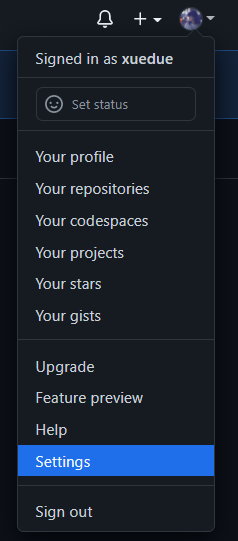
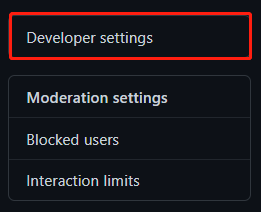
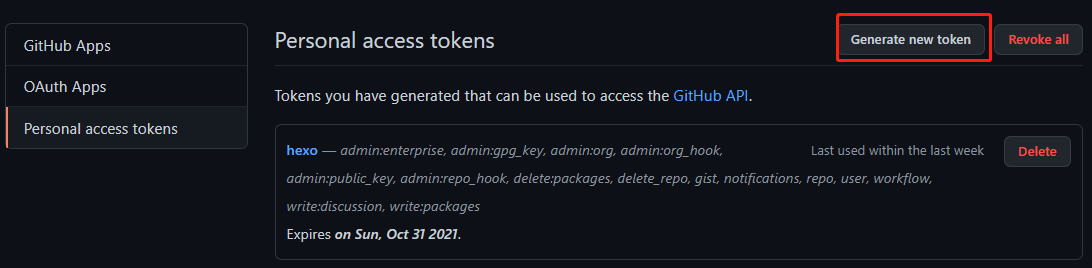
全部勾选并生成token,token便是git push登录时需要输入的密码(只会出现一次,记得复制!
pip install git报错
利用git安装github上的项目报错ERROR: Command errored out with exit status 128: git clone -q https://github.com/xxx/xxx.git /tmp/pip-req-build-88ue_mql Check the logs for full command output.
解决方法
将github网页中的http://换成git://
1 | # 本来是 |
解决 git 访问错误
参考链接:解决 git 报错
在国内访问 git 经常遇到访问报错,或者即使开了全局代理仍然访问失败,解决方法如下
方法一:取消代理设置
这是最常见的解决方法之一,通过在终端执行以下命令,可以取消 Git 的代理设置:
1 | git config --global --unset http.proxy |
方法二:设置系统代理
有时候取消代理设置仍然会出现报错,这时可以通过设置系统代理来解决。具体步骤如下:
在 win10/11 中的设置中搜索代理服务器
打开代理服务器,获取代理服务器的 ip 地址和端口(127.0.0.1:7890)
在终端输入以下命令,设置 Git 使用本地代理
1
git config --global http.proxy http://127.0.0.1:7890
设置完成后,可以通过以下命令检验是否设置成功:
1
git config --global -l
本博客所有文章除特别声明外,均采用 CC BY-NC-SA 4.0 许可协议。转载请注明来源 xuedue!
相关推荐

2021-08-09
Github-stars
Github上star的项目分类StyleGanDesinging an Encoder for StyleGAN Image ManipulationEncoding in Style: a StyleGAN Encoder for Image-to-Image TranslationFace Identity Disentanglement via Latent Space MappingOnly a Matter of Style: Age Transformation Using a Style-Based Regression ModelFace AgingLifespan Age Transformation Synthesis codeOnly a Matter of Style: Age Transformation Using a Style-Based Regression ModelFace Aging with Identity-Preserved Conditional Generative Adversarial NetworksAge Progres...
2025-02-06
Git 整理
git 远程库 代码推送至远程仓库 1git push origin HEAD:refs/for/sandbox/zengruihua/master 远程最新的 commit 以 rebase 的方式同步到本地 1git pull --rebase 使用命令时必须保持本地目录干净(不能有modified文件,可以存在untracked文件) 拉取远程库要想有远程库信息,需要使用git clone 12git clone 远程库 && git cherry-pick FETCH_HEADgit fetch 远程库 && git checkout FETCH_HEAD git add1git add -p 此命令用于交互式添加修改到暂存区的命令。-p 代表 “patch”,允许用户选择要包含在下一次提交中的每个修改 y:表示将当前的修改添加到暂存区,即标记为要提交; n:表示不添加当前的修改到暂存区,即标记为不需要提交,跳过此次修改; q:表示退出当前的 git add -p 对话框; a: 表示添加当前和所有未列出的修改到暂存区,即全部标记为要提交;...

2021-09-22
利用Github Actions实现自动部署
本文参考 GitHub Actions 来自动部署 Hexo 用GitHub Actions 自动部署 Hexo博客 Hexo 部署在Hexo中,以往的部署通常都需要通过命令 123hexo clean # 清空静态页面(public文件夹)hexo g # 创建静态页面hexo d # 发布页面:清空.deploy_git/里文件,从public/复制新生成的文件 在实现自动部署之前,hexo博客必须能够成功运行以上代码并成功部署 实现自动部署生成ssh密钥文件在任何位置的git bash窗口中运行 1ssh-keygen -t rsa -b 4096 -C "Hexo Deploy Key" -f github-deploy-key -N "" 会在当前目录生成两个文件 github-deploy-key —— 私钥 github-deploy-key.pub —— 公钥 创建私人仓库(用于部署)在GitHub中创建repositories,名字随意取,选private,其他勾不勾无所谓然后在你的博客文件夹根目录(不是theme...
评论